
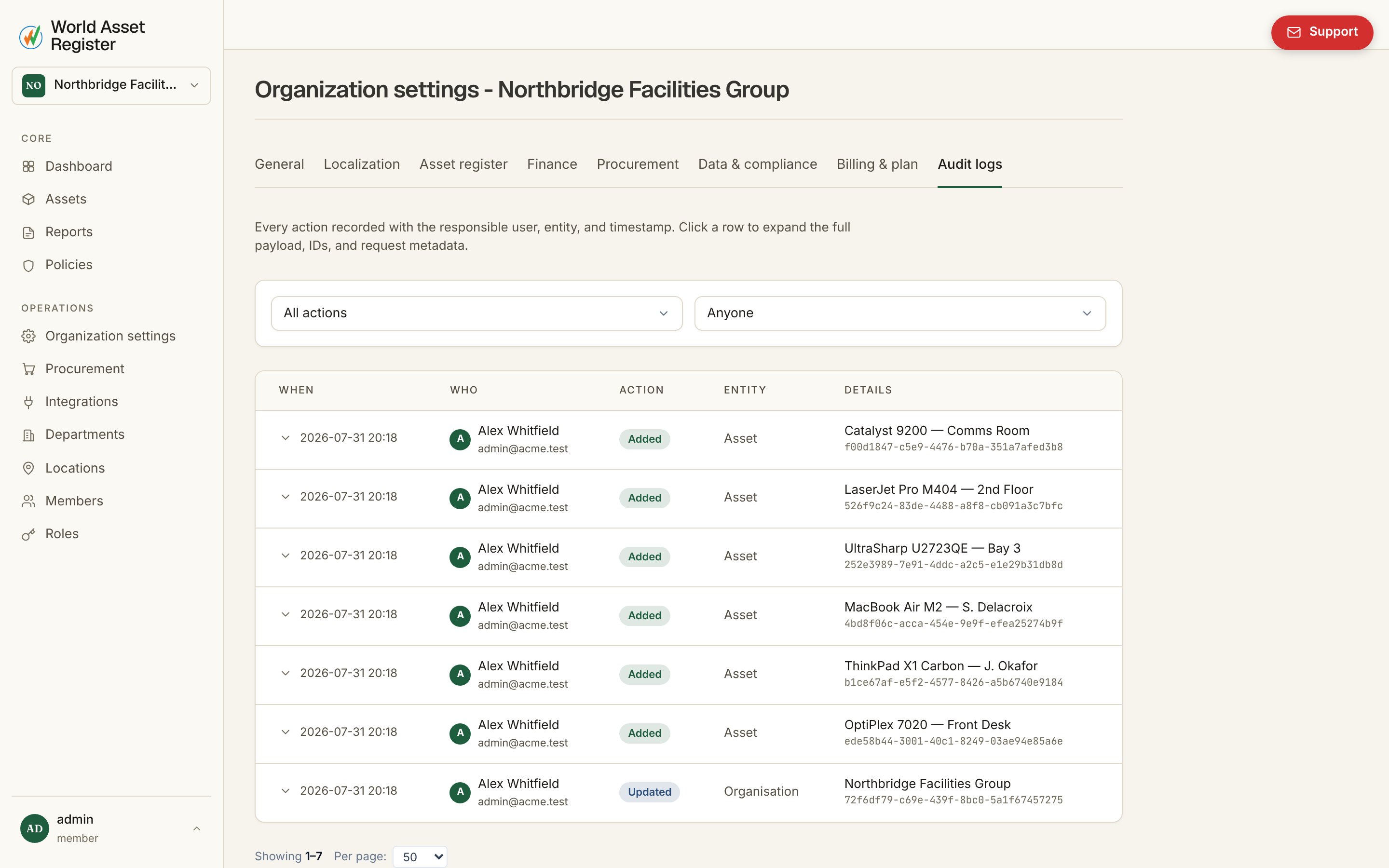
Reading the audit log
Open Organisation → Audit logs. Each entry shows when it happened, who made the change (a person, or System for automated changes), what action it was (added, updated, removed, exported or imported), and what it affected. Click an entry for full detail, including its log ID and, where relevant, the IP address and user agent it came from. Filter by action type or by who made the change to narrow a long list down to exactly what you’re looking for. Work done through change requests is logged too. Submitting, rejecting or withdrawing a request appears as a Change request entry. Approving one appears as a change to the asset, made by the person who approved it. Change request entries themselves are not rolled back. To reverse an approved change, roll back its asset entry.Rolling back
Rollback needs theaudit.rollback permission (or Admin) and works from
any log entry showing Rollback to this point. It reverses every
tracked change made after that entry, newest first, in a single
all-or-nothing operation. Before anything happens, a preview shows
exactly how many changes will be reversed, so nothing is a surprise.
This makes rollback a genuine undo button for the whole organisation,
not just a single record. If an import went wrong or a bulk edit touched
the wrong assets, roll back to the moment before it happened and
everything after that point is reversed together.