> ## Documentation Index
> Fetch the complete documentation index at: https://docs.worldassetregister.com/llms.txt
> Use this file to discover all available pages before exploring further.
# Asset details
> The single page of truth for one asset
Click any asset and you land on its detail page: everything known about
that one thing, in one place. Its fields, money, service history,
paperwork and a complete record of every change ever made to it.
 ## The header
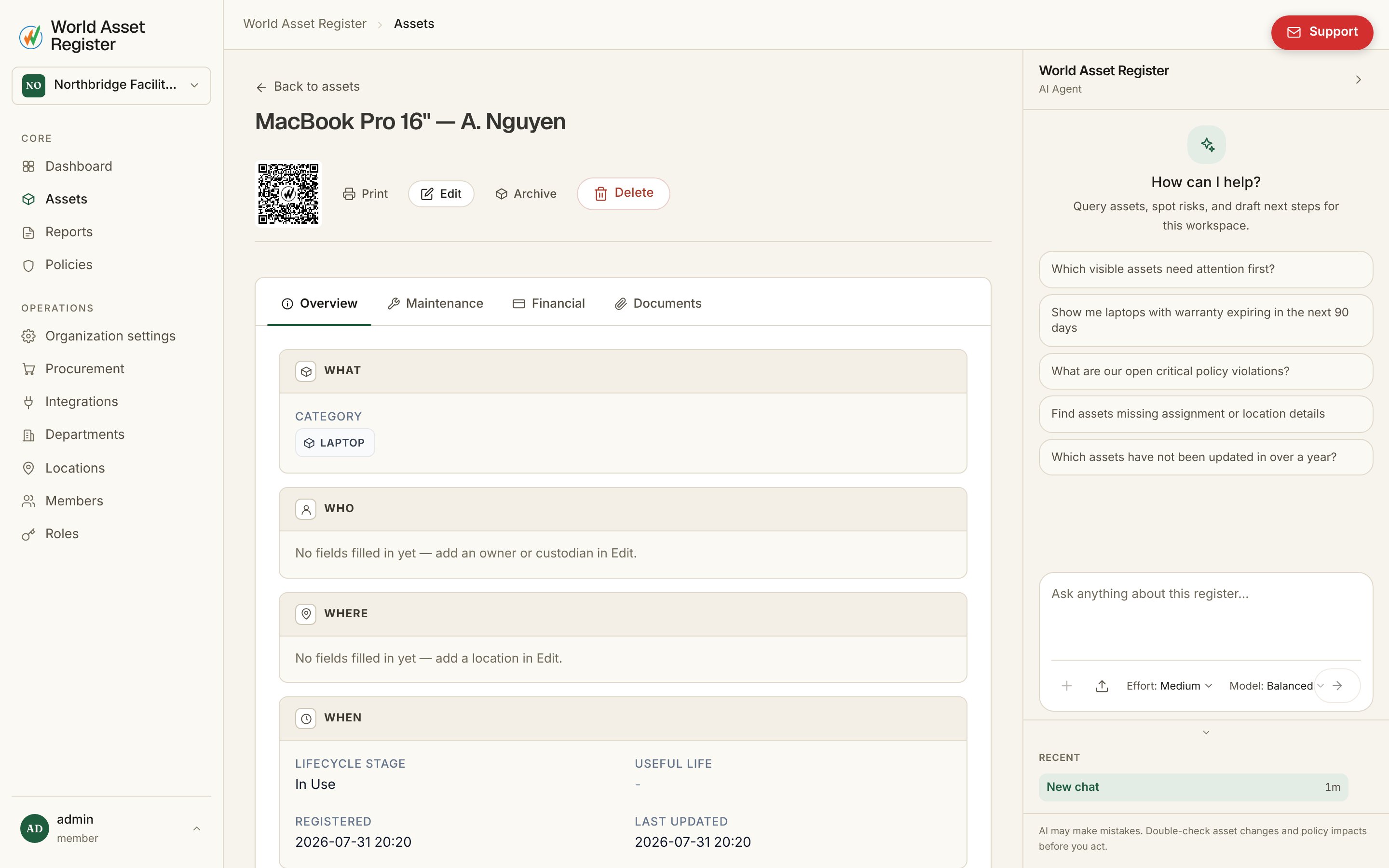
The top of the page carries the asset's identity and its quick actions:
* **QR code**: every asset has one, linking straight to this page. The
**print** button opens a printable label, so you can sticker the
physical item. Anyone who scans it later lands here.
* **Archive, Unarchive and Delete**: archiving hides the asset from
day-to-day views while keeping its history (see [the
difference](/assets/the-register#lifecycle-stages-and-archiving)).
Deleting is permanent and permission-guarded. If your role can only
*request* these actions, the buttons become **Request archive** and
**Request delete**, and route through
[change requests](/assets/change-requests) instead.
* **Change request flag**: an orange flag appears whenever this asset has
edits waiting for approval. Click it to review them.
## Editing
Hit **Edit** and every field becomes editable in place. The save button
floats with you and saves without closing the page, so you can keep
working through fields. It's the same editor you get when creating an
asset, in the [bulk edit panel](/assets/bulk-editing), and here.
Two things worth knowing:
* **Money fields carry their own currency.** Purchase cost, current value
and any custom currency field each store an amount *and* a currency, so
a register spanning AUD, USD and EUR stays honest, and reports convert
for you.
* **Fields you can't change directly** (per your role) are either hidden,
read only, or marked as request only. Editing a request-only field
submits a [change request](/assets/change-requests) rather than saving.
## Tabs
Which tabs an asset shows depends on its **category**. A vehicle needs a
maintenance history, a software licence doesn't. Administrators switch
these on per category under
[Categories and fields](/setup/categories-and-fields#modules-per-category).
* **Overview** *(always shown)*: every field on the asset, grouped and
formatted, including who holds it (owner, custodian) and where it is.
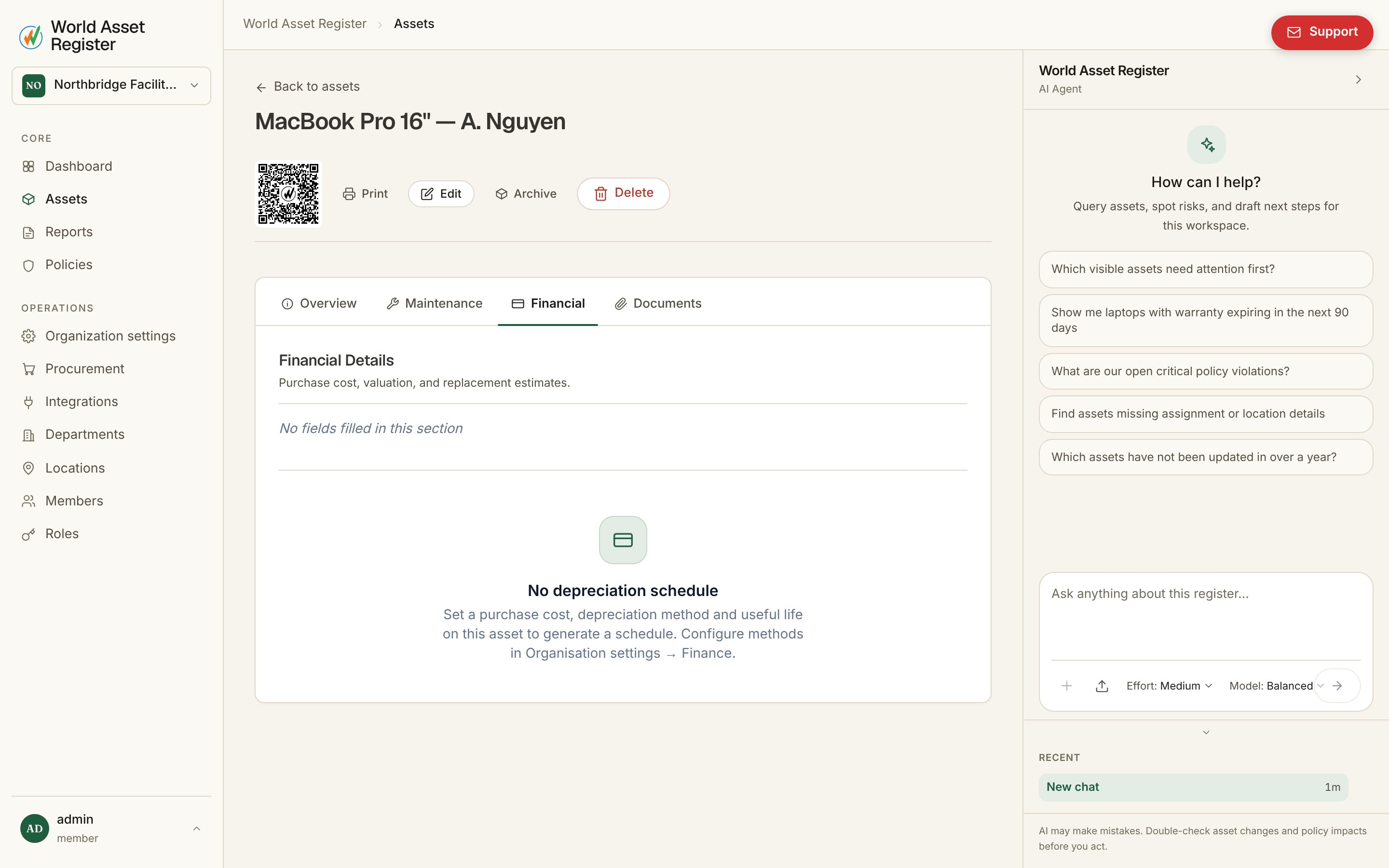
* **Financial**: purchase cost, current valuation and replacement
estimates, plus the **depreciation schedule**. Pick a method and the
book value curve is calculated for you, year by year.
## The header
The top of the page carries the asset's identity and its quick actions:
* **QR code**: every asset has one, linking straight to this page. The
**print** button opens a printable label, so you can sticker the
physical item. Anyone who scans it later lands here.
* **Archive, Unarchive and Delete**: archiving hides the asset from
day-to-day views while keeping its history (see [the
difference](/assets/the-register#lifecycle-stages-and-archiving)).
Deleting is permanent and permission-guarded. If your role can only
*request* these actions, the buttons become **Request archive** and
**Request delete**, and route through
[change requests](/assets/change-requests) instead.
* **Change request flag**: an orange flag appears whenever this asset has
edits waiting for approval. Click it to review them.
## Editing
Hit **Edit** and every field becomes editable in place. The save button
floats with you and saves without closing the page, so you can keep
working through fields. It's the same editor you get when creating an
asset, in the [bulk edit panel](/assets/bulk-editing), and here.
Two things worth knowing:
* **Money fields carry their own currency.** Purchase cost, current value
and any custom currency field each store an amount *and* a currency, so
a register spanning AUD, USD and EUR stays honest, and reports convert
for you.
* **Fields you can't change directly** (per your role) are either hidden,
read only, or marked as request only. Editing a request-only field
submits a [change request](/assets/change-requests) rather than saving.
## Tabs
Which tabs an asset shows depends on its **category**. A vehicle needs a
maintenance history, a software licence doesn't. Administrators switch
these on per category under
[Categories and fields](/setup/categories-and-fields#modules-per-category).
* **Overview** *(always shown)*: every field on the asset, grouped and
formatted, including who holds it (owner, custodian) and where it is.
* **Financial**: purchase cost, current valuation and replacement
estimates, plus the **depreciation schedule**. Pick a method and the
book value curve is calculated for you, year by year.
 * **Maintenance**: the service history. Each record carries a date, cost
(with currency), notes and attachments, and its own change history. A
useful trick is **Copy to other assets**, which applies the same
maintenance record across many assets at once. One entry covers the
day the whole fleet was serviced.
* **Documents**: invoices, warranties, manuals, photos. PDFs and images
preview in the browser, and Office files download. Everything is
stored against the asset, so the paperwork is wherever the asset is.
## Parents, children and dependencies
Assets can be linked into hierarchies: a server and its rack, a trailer
and its truck, a licence and the machine it's installed on. The
**Parents** and **Children** fields are bidirectional. Link either side
and both assets show the relationship. Policies can watch these links,
so retiring a parent whose children are still in use raises a
[violation](/operate/policies) instead of a surprise.
## History
Every change to the asset, by a person, an import, an integration or the
AI assistant, is recorded with who, what, when, and the values before and
after. Administrators can roll back a single bad change or the whole
organisation to a point in time. See
[Audit log and rollback](/operate/audit-and-rollback).
* **Maintenance**: the service history. Each record carries a date, cost
(with currency), notes and attachments, and its own change history. A
useful trick is **Copy to other assets**, which applies the same
maintenance record across many assets at once. One entry covers the
day the whole fleet was serviced.
* **Documents**: invoices, warranties, manuals, photos. PDFs and images
preview in the browser, and Office files download. Everything is
stored against the asset, so the paperwork is wherever the asset is.
## Parents, children and dependencies
Assets can be linked into hierarchies: a server and its rack, a trailer
and its truck, a licence and the machine it's installed on. The
**Parents** and **Children** fields are bidirectional. Link either side
and both assets show the relationship. Policies can watch these links,
so retiring a parent whose children are still in use raises a
[violation](/operate/policies) instead of a surprise.
## History
Every change to the asset, by a person, an import, an integration or the
AI assistant, is recorded with who, what, when, and the values before and
after. Administrators can roll back a single bad change or the whole
organisation to a point in time. See
[Audit log and rollback](/operate/audit-and-rollback).